Easy Multimodal Music Search with S3 Vectors
With AWS S3 Vectors, you can do vector-based similarity search using S3 alone — no separate vector DB required.
In this post, I embed audio from the MusicCaps music dataset (including captions) with CLAP, and wire up a multimodal music search system that retrieves songs by text query — built in moments with aws-cdk and uv.
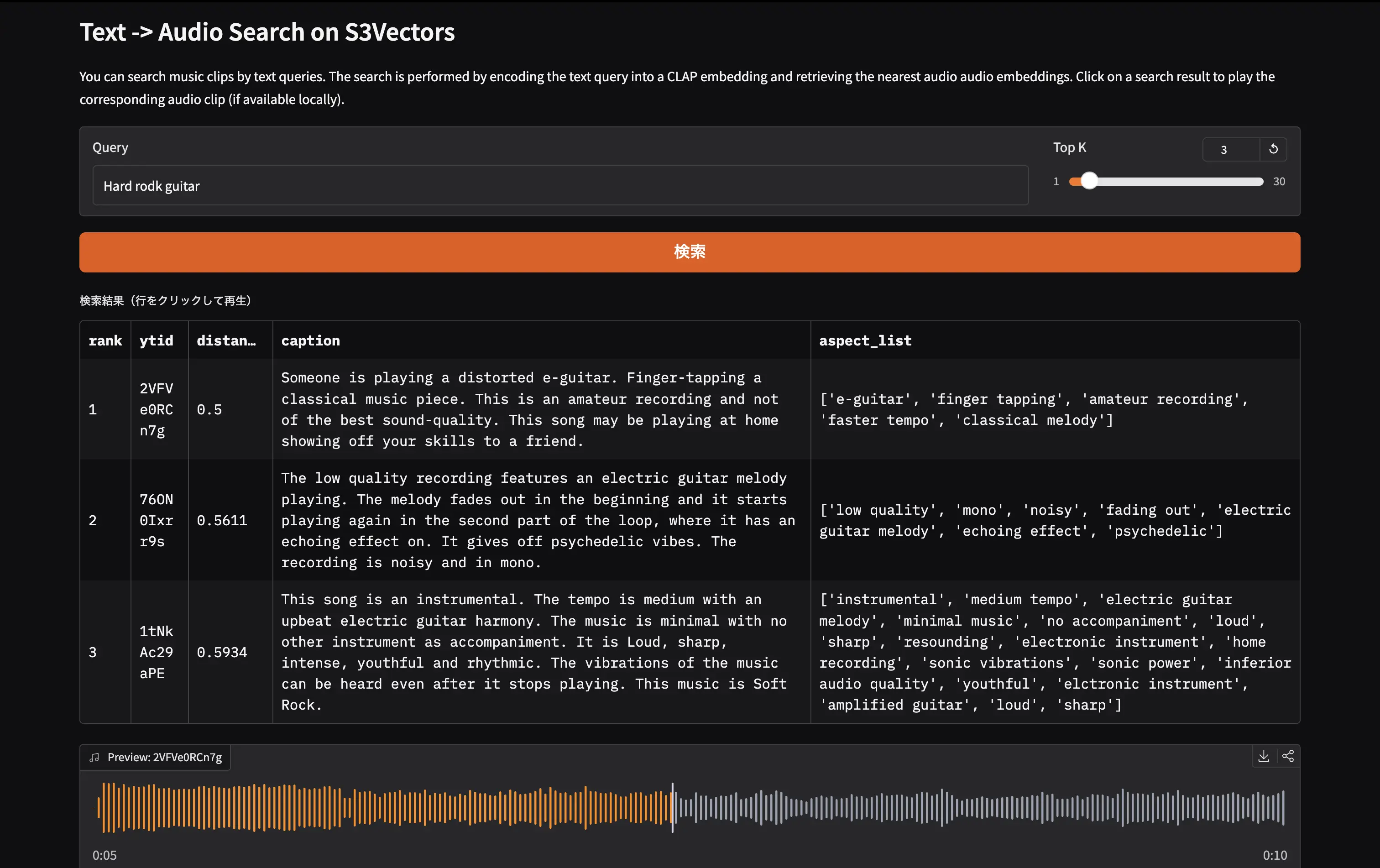
In the demo app built with gradio, you can search songs with text inputs.
The full source code is in the repository below.
atsukoba/MusicCap-S3VectorsSearch-CLAP
https://github.com/atsukoba/MusicCap-S3VectorsSearch-CLAPS3 Vectors
Amazon S3 Vectors is a native vector storage feature of S3, which became generally available in July 2025.
Amazon S3 Vectors is the first cloud storage with native vector support at scale. — AWS Blog: Introducing Amazon S3 Vectors
Previously, setting up vector search required dedicated infrastructure — Pinecone, Weaviate, pgvector, etc. S3 Vectors introduces a new "vector bucket" type where you can store and search vectors with the same feel as ordinary object storage.
- Cost: Up to 90% cost reduction compared to managed vector databases
- Scale: Up to 10,000 vector indexes per bucket, each holding tens of millions of vectors
- Serverless: No infrastructure provisioning required, pay-per-use
- AWS ecosystem: Native integration with Amazon Bedrock Knowledge Bases and SageMaker Unified Studio (not used in this post)
Using boto3
S3 Vectors is operated via a new boto3 client called s3vectors. Inserting vectors uses put_vectors and searching uses query_vectors.
1import boto3
2
3s3vectors = boto3.client("s3vectors", "ap-northeast-1")
4
5s3vectors.put_vectors(
6    vectorBucketName="music-cap-vectors",
7    indexName="music-embeddings",
8    vectors=[
9        {
10            "key": "track_001",
11            "data": {"float32": [0.12, -0.34, ...]},
12            "metadata": {"caption": "A soft piano melody ...", "ytid": "abc123"},  # arbitrary metadata
13        },
14    ],
15)
16
17response = s3vectors.query_vectors(
18    vectorBucketName="music-cap-vectors",
19    indexName="music-embeddings",
20    queryVector={"float32": [0.05, -0.28, ...]},
21    topK=10,
22    returnMetadata=True,
23    returnDistance=True,
24)
MusicCaps Dataset
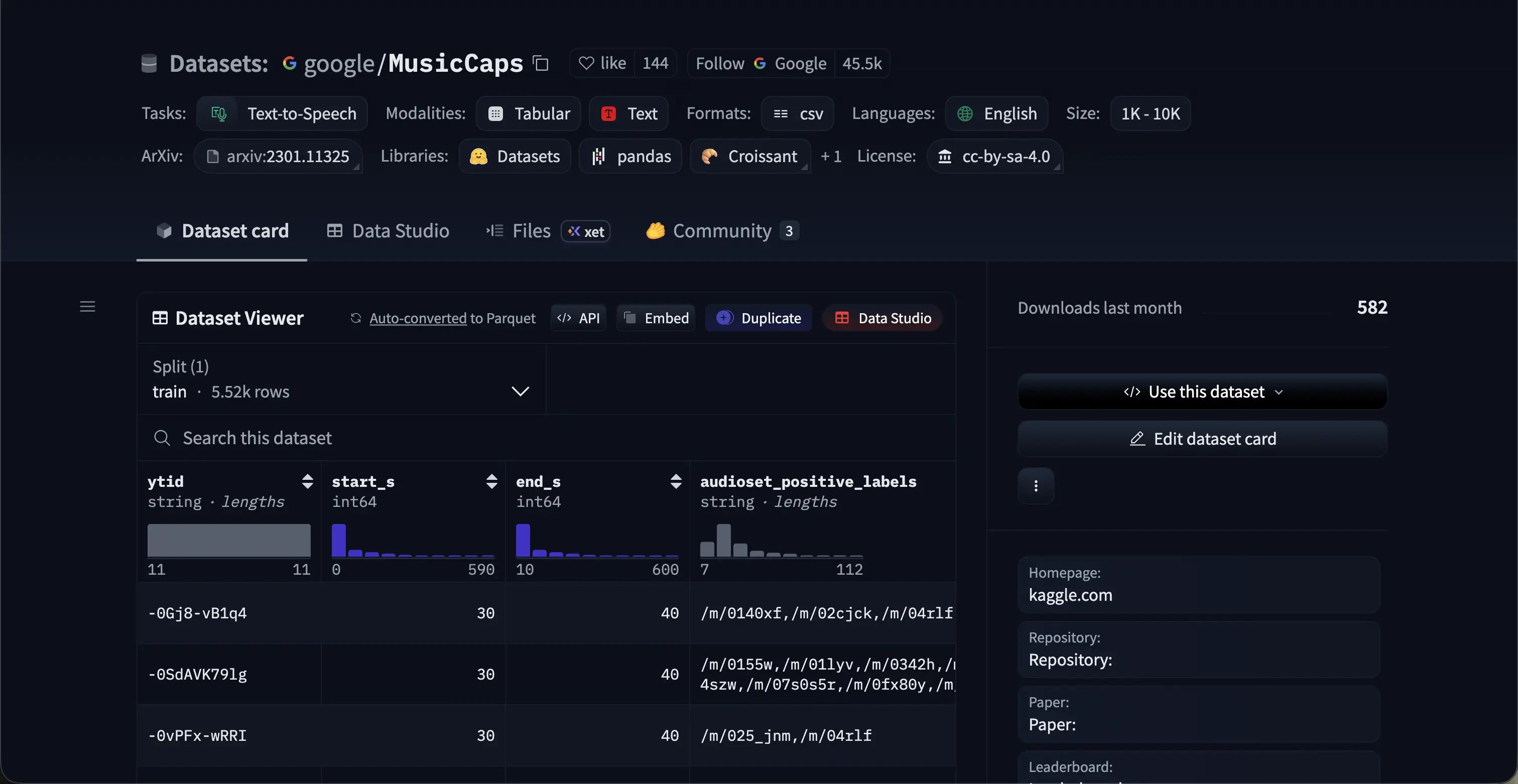
MusicCaps is a music captioning dataset published by Google, containing 5,521 music clip–text description pairs.
https://huggingface.co/datasets/google/MusicCaps- Each clip is a 10-second audio segment sourced from YouTube (via AudioSet timing metadata)
- Descriptions are written by professional musicians — roughly 4 sentences on average covering genre, instrumentation, mood, tempo, and timbre
- An aspect list of keywords ("mellow piano melody", "fast-paced drums", etc.) is also included
- License: CC-BY-SA 4.0
The dataset has columns such as ytid (YouTube ID), start_s, end_s, caption, and aspect_list. The actual audio must be fetched from YouTube with yt-dlp.
Note: Downloading videos from YouTube is prohibited under YouTube's Terms of Service. The methods described in this article are for research and educational purposes only and should be used at your own risk.
1from datasets import load_dataset
2
3ds = load_dataset("google/MusicCaps", split="train", token=HF_TOKEN)
4# 5521 examples
5# Features: ytid, start_s, end_s, audioset_positive_labels, aspect_list, caption, ...
Fetching audio with yt-dlp using --download-sections to clip the exact segment:
1yt-dlp --quiet --no-warnings -x --audio-format wav -f bestaudio \
2    -o "{ytid}.wav" \
3    --download-sections "*{start_s}-{end_s}" \
4    "https://www.youtube.com/watch?v={ytid}"
Note: Some clips may not be available. Without
HF_TOKENset in.env, the dataset is limited to 32 samples.
CLAP: Joint Audio-Text Embeddings
CLAP (Contrastive Language-Audio Pretraining) is an open-source multimodal model from LAION — think of it as the audio counterpart of OpenAI's CLIP (images × text).
Large-scale Contrastive Language-Audio Pretraining with Feature Fusion and Keyword-to-Caption Augmentation — Wu et al., ICASSP 2023 (arXiv
.06687)
Architecture
CLAP has an audio encoder (HTSAT-based) and a text encoder (RoBERTa-based), both trained contrastively so that their embeddings land in the same latent space.
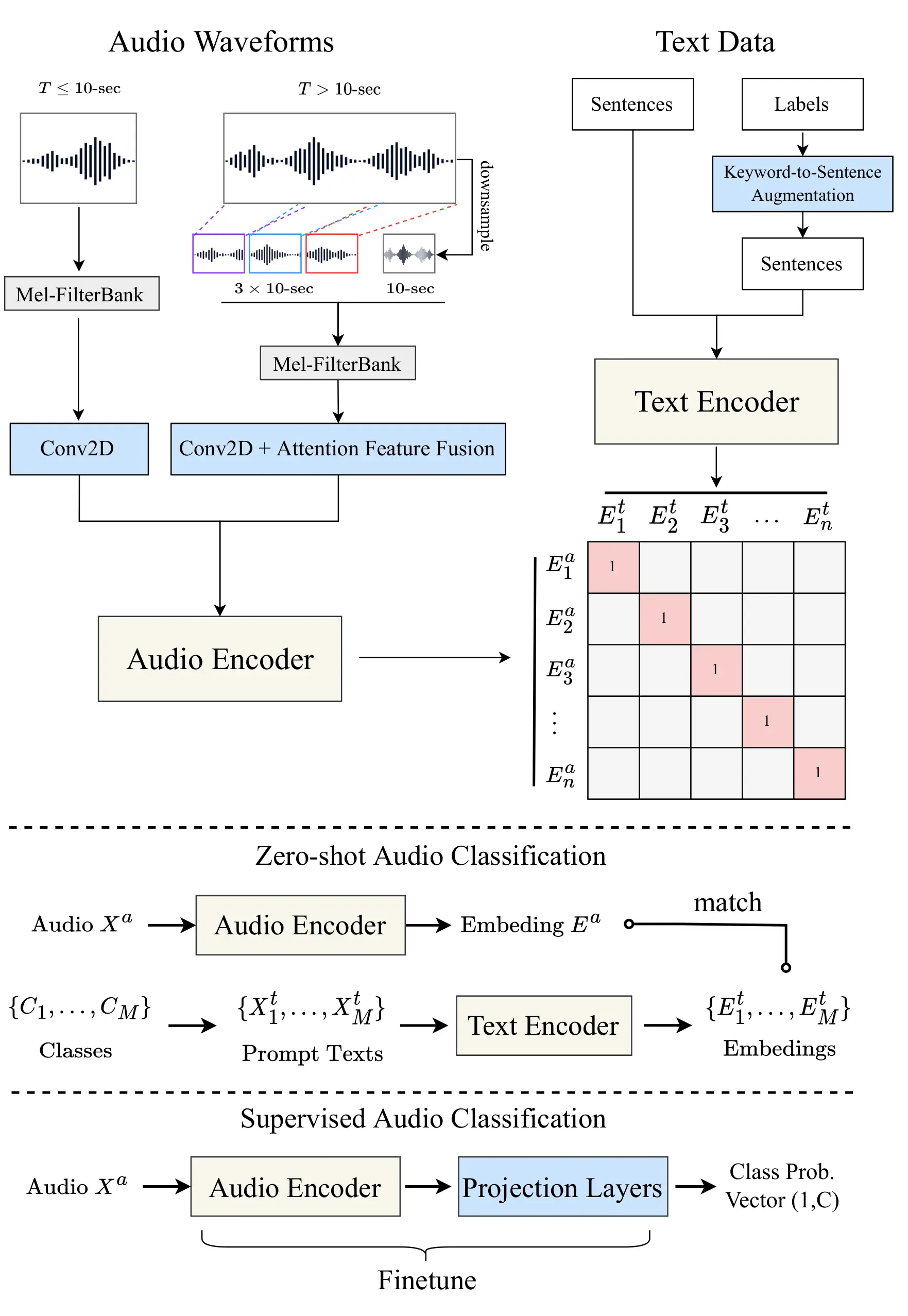
Because audio and text embeddings share a common space, computing cosine distance is all it takes to do text → music retrieval.
Loading via HuggingFace Transformers
This project uses laion/clap-htsat-unfused loaded via HuggingFace Transformers.
1import torch
2from transformers import AutoModel, AutoTokenizer, AutoProcessor, ClapModel
3
4MODEL_ID = "laion/clap-htsat-unfused"
5
6# Use float32 on Apple Silicon (float16 causes MPS broadcast errors); float16 elsewhere
7dtype = torch.float32 if torch.backends.mps.is_available() else torch.float16
8model: ClapModel = AutoModel.from_pretrained(
9    MODEL_ID, dtype=dtype, device_map="auto"
10).eval()
11
12tokenizer = AutoTokenizer.from_pretrained(MODEL_ID)
13processor = AutoProcessor.from_pretrained(MODEL_ID)
Text Embeddings
1import numpy as np
2
3def get_text_embeddings(texts: list[str]) -> list[float]:
4    inputs = tokenizer(texts, padding=True, return_tensors="pt").to(model.device)
5    features = model.get_text_features(**inputs)
6    return (
7        features["pooler_output"][0, :]
8        .detach().cpu().numpy().astype(np.float32).tolist()
9    )
Audio Embeddings
1from datasets import Dataset, Audio
2
3def get_audio_embeddings(audio_path: str) -> list[float]:
4    input_features = processor(
5        audio=Dataset.from_dict({"audio": [audio_path]}).cast_column(
6            "audio", Audio(sampling_rate=48000)
7        )[0]["audio"]["array"],
8        sampling_rate=48000,
9        return_tensors="pt",
10    )["input_features"].to(model.device)
11    features = model.get_audio_features(input_features=input_features)
12    return (
13        features["pooler_output"][0, :]
14        .detach().cpu().numpy().astype(np.float32).tolist()
15    )
pooler_output yields a 512-dimensional L2-normalized vector.
Implementation Walkthrough
Download the Dataset and Audio Files
scripts/create_demo_datasets.py loads the MusicCaps metadata from HuggingFace Hub and downloads audio clips with yt-dlp. datasets.map with num_proc handles parallel downloads.
1from datasets import Audio, load_dataset
2
3ds = load_dataset(
4    "google/MusicCaps", split="train",
5    cache_dir=str(data_dir / "MusicCaps"),
6    token=HF_TOKEN,
7).select(range(samples_to_load))
8
9ds = ds.map(
10    lambda example: _process(example, data_dir / "audio"),
11    num_proc=4,
12).cast_column("audio", Audio(sampling_rate=44100))
Create Embeddings with CLAP
scripts/create_embeddings.py processes each downloaded clip through CLAP's audio encoder and saves the result as a per-ytid .npy file.
1from tqdm import tqdm
2from torch import Tensor
3
4musiccaps_ds = (
5    load_dataset("google/MusicCaps", split="train", ...)
6    .map(link_audio_fn(str(data_dir / "audio")), batched=True)
7    .filter(lambda d: os.path.exists(d["audio"]))
8    .cast_column("audio", Audio(sampling_rate=48000))
9    .map(process_audio_fn(processor, sampling_rate=48000))
10)
11
12for _data in tqdm(musiccaps_ds):
13    _input = Tensor(_data["input_features"]).unsqueeze(0).to(model.device)
14    audio_embed = model.get_audio_features(_input)
15    np.save(
16        data_dir / "embeddings" / f"{_data['ytid']}.npy",
17        audio_embed["pooler_output"][0, :].detach().cpu().numpy(),
18    )
Provision S3 Vectors with AWS CDK
The vector bucket and index are provisioned with AWS CDK (TypeScript). aws-cdk-lib/aws-s3vectors provides L1 constructs that map directly to the CloudFormation resource types.
1// cdk/lib/cdk-stack.ts
2import * as s3vectors from "aws-cdk-lib/aws-s3vectors";
3
4// Vector bucket
5const vectorBucket = new s3vectors.CfnVectorBucket(
6  this,
7  "MusicCapVectorBucket",
8  {
9    vectorBucketName: "music-cap-vectors",
10  },
11);
12
13// 512-dim float32 index with cosine similarity
14const vectorIndex = new s3vectors.CfnIndex(this, "MusicEmbeddingsIndex", {
15  vectorBucketName: vectorBucket.vectorBucketName!,
16  indexName: "music-embeddings",
17  dataType: "float32",
18  dimension: 512,
19  distanceMetric: "cosine",
20});
21vectorIndex.addDependency(vectorBucket);
Deploy with the CDK CLI:
1cd cdk/
2pnpm install
3pnpm cdk bootstrap   # first time only
4pnpm cdk deploy
On success you get:
1CdkStack.VectorBucketArn = arn:aws:s3vectors:ap-northeast-1:123456789012:bucket/music-cap-vectors
2CdkStack.VectorIndexArn  = arn:aws:s3vectors:ap-northeast-1:123456789012:bucket/music-cap-vectors/index/music-embeddings
PUT Vectors with boto3
scripts/upload_vectors.py handles ingestion. It first paginates through list_vectors to fetch existing keys so only new vectors are uploaded (incremental ingestion).
1import boto3
2import numpy as np
3
4S3_BUCKET_NAME = "music-cap-vectors"
5S3_INDEX_NAME  = "music-embeddings"
6BATCH_SIZE     = 100
7
8s3vectors = boto3.client("s3vectors", region_name="ap-northeast-1")
9
10vectors_to_put = []
11
12for sample in musiccaps_ds:
13    ytid = sample["ytid"]
14    embedding = np.load(f"data/embeddings/{ytid}.npy").astype(np.float32)
15    vec = embedding.squeeze()
16
17    vectors_to_put.append({
18        "key": ytid,
19        "data": {"float32": vec.tolist()},
20        "metadata": {
21            "ytid": ytid,
22            "caption": str(sample["caption"]),
23            "aspect_list": ", ".join(sample["aspect_list"]),
24            "start_s": str(sample["start_s"]),
25            "end_s": str(sample["end_s"]),
26        },
27    })
28
29    if len(vectors_to_put) >= BATCH_SIZE:
30        s3vectors.put_vectors(
31            vectorBucketName=S3_BUCKET_NAME,
32            indexName=S3_INDEX_NAME,
33            vectors=vectors_to_put,
34        )
35        vectors_to_put = []
Metadata type constraint: all metadata values must be strings for S3 Vectors.
⑤ Search for Music with a Text Query
demo/search.py embeds the query with CLAP's text encoder and calls query_vectors.
1# demo/search.py
2from botocore.config import Config
3import boto3
4from demo.config import S3_BUCKET_NAME, S3_INDEX_NAME
5
6s3vectors_client = boto3.client(
7    "s3vectors", "ap-northeast-1",
8    config=Config(connect_timeout=10, read_timeout=10),
9)
10
11def search(embedding: list[float], top_k: int = 10):
12    response = s3vectors_client.query_vectors(
13        vectorBucketName=S3_BUCKET_NAME,
14        indexName=S3_INDEX_NAME,
15        queryVector={"float32": embedding},
16        topK=top_k,
17        returnMetadata=True,
18        returnDistance=True,
19    )
20    return response["vectors"]
Example result (lower distance = more similar under cosine distance):
1{
2    'distance': 0.360,
3    'key': '2unse6chkMU',
4    'metadata': {
5        'caption': 'This is a piece that would be suitable as calming study music...',
6        'aspect_list': 'calming piano music, soothing, bedtime music, sleep music, piano, reverb, violin',
7        'ytid': '2unse6chkMU',
8        ...
9    }
10}
Build the Demo UI with Gradio
demo/app.py uses gr.Blocks to display results in a gr.Dataframe. Clicking a row triggers local audio playback if the file is available.
1# demo/app.py
2import gradio as gr
3import pandas as pd
4from demo.feature_extract import get_text_embeddings
5from demo.local_data import get_local_audio_by_ytid
6from demo.search import search
7
8def do_search(query: str, top_k: int) -> tuple[pd.DataFrame, dict]:
9    embedding = get_text_embeddings([query])
10    results = search(embedding, top_k=int(top_k))
11    rows = [
12        {
13            "rank": i + 1,
14            "ytid": r["key"],
15            "distance": round(r["distance"], 4),
16            "caption": r.get("metadata", {}).get("caption", ""),
17            "aspect_list": r.get("metadata", {}).get("aspect_list", ""),
18        }
19        for i, r in enumerate(results)
20    ]
21    return pd.DataFrame(rows), gr.update(value=None, visible=False)
22
23def on_select(df: pd.DataFrame, evt: gr.SelectData) -> dict:
24    ytid = str(df.iloc[evt.index[0]]["ytid"])
25    audio_path = get_local_audio_by_ytid(ytid)
26    return gr.update(value=audio_path, label=f"Preview: {ytid}", visible=True)
27
28with gr.Blocks(title="MusicCap Search") as demo:
29    gr.Markdown("# Text -> Audio Search on S3Vectors")
30    with gr.Row():
31        query_input = gr.Textbox(placeholder="ex: calming piano music with soft strings", label="Query", scale=4)
32        top_k_slider = gr.Slider(minimum=1, maximum=30, value=10, step=1, label="Top K", scale=1)
33    search_btn = gr.Button("検索", variant="primary")
34    results_df = gr.Dataframe(
35        headers=["rank", "ytid", "distance", "caption", "aspect_list"],
36        label="検索結果(行をクリックして再生)",
37        interactive=False, wrap=True,
38    )
39    audio_player = gr.Audio(label="Preview", visible=False)
40    search_btn.click(fn=do_search, inputs=[query_input, top_k_slider], outputs=[results_df, audio_player])
41    query_input.submit(fn=do_search, inputs=[query_input, top_k_slider], outputs=[results_df, audio_player])
42    results_df.select(fn=on_select, inputs=[results_df], outputs=[audio_player])
43
44demo.launch()
1uv run python -m demo.app
Evaluation
This is a simple validation to verify that the search system is working properly.
While all current vector data is computed from audio, the original MusicCaps dataset includes human-written captions and taxonomies. We test whether we can retrieve samples by searching with their ground truth captions and aspect lists.
For this demo, I randomly selected 1024 samples from the 5,521-sample dataset, successfully downloaded 960 of them, and built an S3 Vectors index. Queries use the caption text and aspect_list tags.
Example: id=-7B9tPuIP-w
caption
1A male voice narrates a monologue to the rhythm of a song in the background. The song is fast tempo with enthusiastic drumming, groovy bass lines,cymbal ride, keyboard accompaniment ,electric guitar and animated vocals. The song plays softly in the background as the narrator speaks and burgeons when he stops. The song is a classic Rock and Roll and the narration is a Documentary.
aspect_list
1['r&b', 'soul', 'male vocal', 'melodic singing', 'strings sample', 'strong bass', 'electronic drums', 'sensual', 'groovy', 'urban']
Queries retrieve top_k=100 results ranked by cosine similarity, and we compute Precision@k (or rather, top-k accuracy).
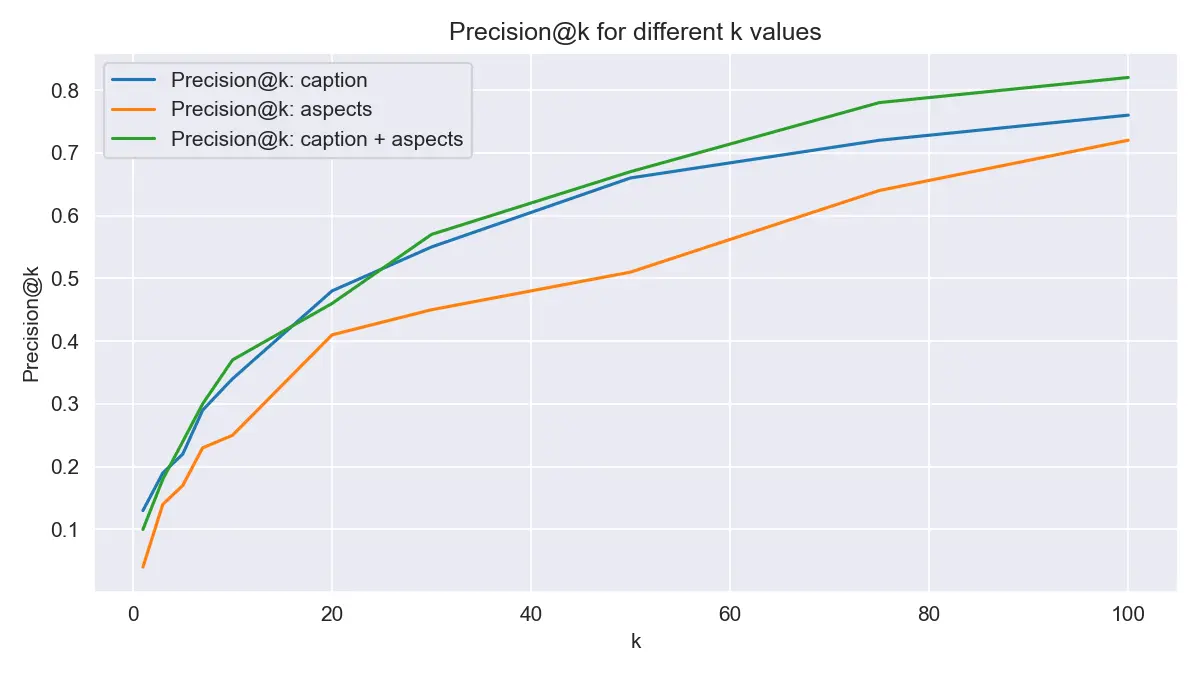
Results show that when searching with 960 samples, approximately 40% of queries return the original sample in the top 10.
Reflections and Summary
S3 Vectors really is easy
A few lines of CDK to define the bucket and index, then plain put_vectors / query_vectors boto3 calls — no extra managed service to keep running. The developer experience is remarkably clean.
For prototypes or small-to-medium workloads (up to a few million vectors), S3 Vectors is well worth evaluating before reaching for Pinecone or Weaviate.
CLAP search quality
Using laion/clap-htsat-unfused via HuggingFace Transformers gave good results for queries about instruments, genre, and tempo. Emotional queries ("sad", "happy") were a bit noisier. It is worth noting that some MusicCaps captions may overlap with CLAP's training data, so benchmarking results should be interpreted with care.
Apple Silicon works too
Setting dtype=torch.float32 when torch.backends.mps.is_available() keeps things running on M-series Macs — float16 triggers MPS broadcast errors with this model. The M4 Max ran inference without issues.
References
- Introducing Amazon S3 Vectors - AWS Blog
- Amazon S3 Vectors - Getting Started
- boto3 S3Vectors Reference
- LAION-AI/CLAP - GitHub
- laion/clap-htsat-unfused - Hugging Face
- Large-scale Contrastive Language-Audio Pretraining (arXiv.06687)
- google/MusicCaps - Hugging Face
- MusicCaps overview article - Zenn (tatexh)