Because I wanted to display the Git branch in the prompt, I changed PS1 (The primary prompt string) in ~/.bashrc based on Customize the prompt to display the git branch, so this is a memorandum.
After setting the above,
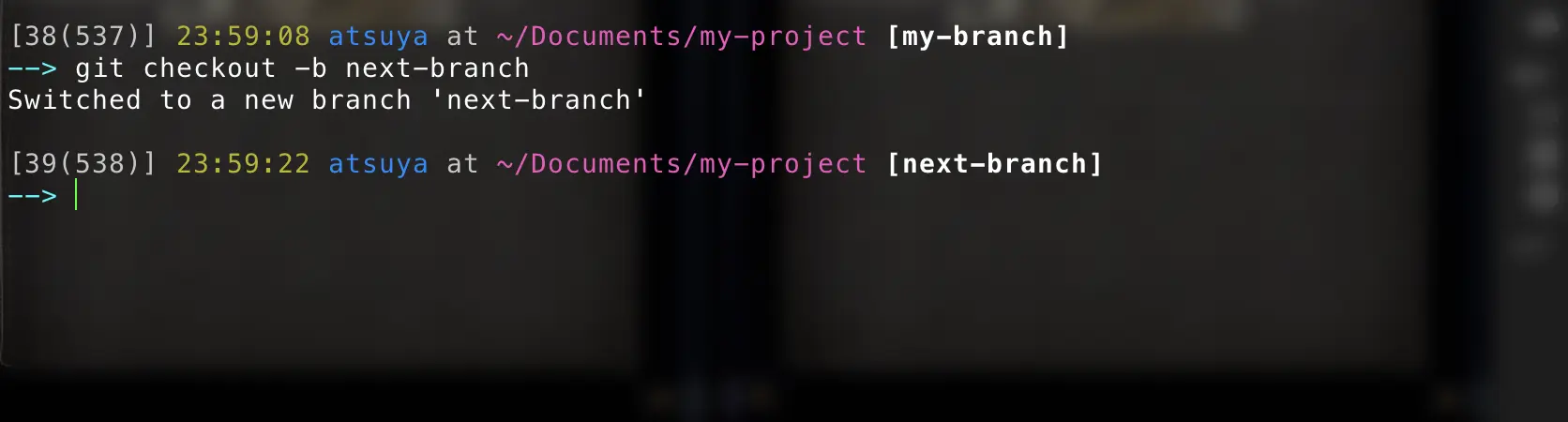
It became like this.
Memorandum
According to 2.5. Bash Prompt Escape Sequences, it is as follows.
\h=> Hostname\u=> Username\w=> Directory (full path)\W=> Directory\t=> Time (24-hour format)\T=> Time (12-hour format)\@=> AM / PM\d=> Date\D=> Date and time\#=> Command number\!=> History number\n=> Newline
As for the display,
1[<Command number>(<History number>)] <Time HH:MM:SS> <user> at <directory> [<branch>]
It becomes like this.
In the <branch> part, parse_git_branch is called, and inside it, the result of git branch --no-color is replaced with sed, and errors (2) are discarded to /dev/null.
Also, as mentioned in the article above, the following variables can be used for color settings:
1local  BLUE="\[\e[1;34m\]"
2local  RED="\[\e[1;31m\]"
3local  GREEN="\[\e[1;32m\]"
4local  WHITE="\[\e[00m\]"
5local  GRAY="\[\e[1;37m\]"
By the way
It seems that PS2 (The secondary prompt string) can also be set, but it's troublesome so I'll leave it alone.

